How to add music to Instagram Stories: a complete guide

To add music to an Instagram Story, open the Story camera, tap the music note icon (or the sticker tray), search for a track, trim it to the clip you want, and share.
That’s the whole task. The rest of this guide covers the details that trip people up: linking songs from Spotify, Apple Music, SoundCloud and Shazam, why business accounts see a smaller music library, and what to do when the music option doesn’t appear at all.
Music isn’t decoration. It sets the pace and mood of a Story, and the right track gives a flat clip a reason to be watched to the end. For brands and creators, that’s the difference between a Story people skip and one they finish.
Key takeaways:
- The fastest method is in-app: tap the music note icon on the Story camera, pick a track, trim, share.
- You can link tracks from Spotify, Apple Music, SoundCloud and Shazam, but the audio won’t play; only the artwork and link carry across.
- Business accounts see a smaller, commercially cleared music library. That’s by design, not a bug.
- If music isn’t showing at all, it’s usually a region restriction, an outdated app, or a branded-content setting.
Why add music to your Instagram Stories?
Music changes how a Story feels. There’s evidence that hearing music we like stimulates the limbic system, the part of the brain that processes emotion, and a track we genuinely connect with can trigger a dopamine release and a sense of wellbeing.
For brands and creators, that emotional shift is the point. A Story carrying a product, a launch or a behind-the-scenes moment lands differently with the right track behind it. Music builds familiarity and likeability, holds attention longer, and gives the content a mood the visuals alone can’t.
How we see it: the music is a small lever, but the system around it is what compounds. Picking a track is easy. Building a consistent creative signature across hundreds of Stories, so the sound, pacing and tone reinforce the brand every time, is the harder, more valuable work.
How to add music to Instagram Stories in the app
There are several ways to add music to a Story, but in-app is the easiest. Here’s how:
- Capture or upload your content. Open your Instagram profile and tap the + next to your profile picture. Use the camera to film, or select something from your camera roll.
- Open the music option. Tap the sticker icon and choose the music sticker, or tap the music note icon directly.
- Choose your track. You’ll see a ‘For you’ tab of curated suggestions and a ‘Browse’ tab where you can filter by genre. Use the search bar to find a specific song or artist.
- Set how the music displays. Once you’ve selected a track, choose to show the lyrics on screen, the cover art and artist details, or just the music with no overlay.
- Choose your snippet. A scrollable bar at the bottom lets you set the exact section of the song you want to use.
- Finish up. Add any other Story elements, tap ‘Done’, and share.
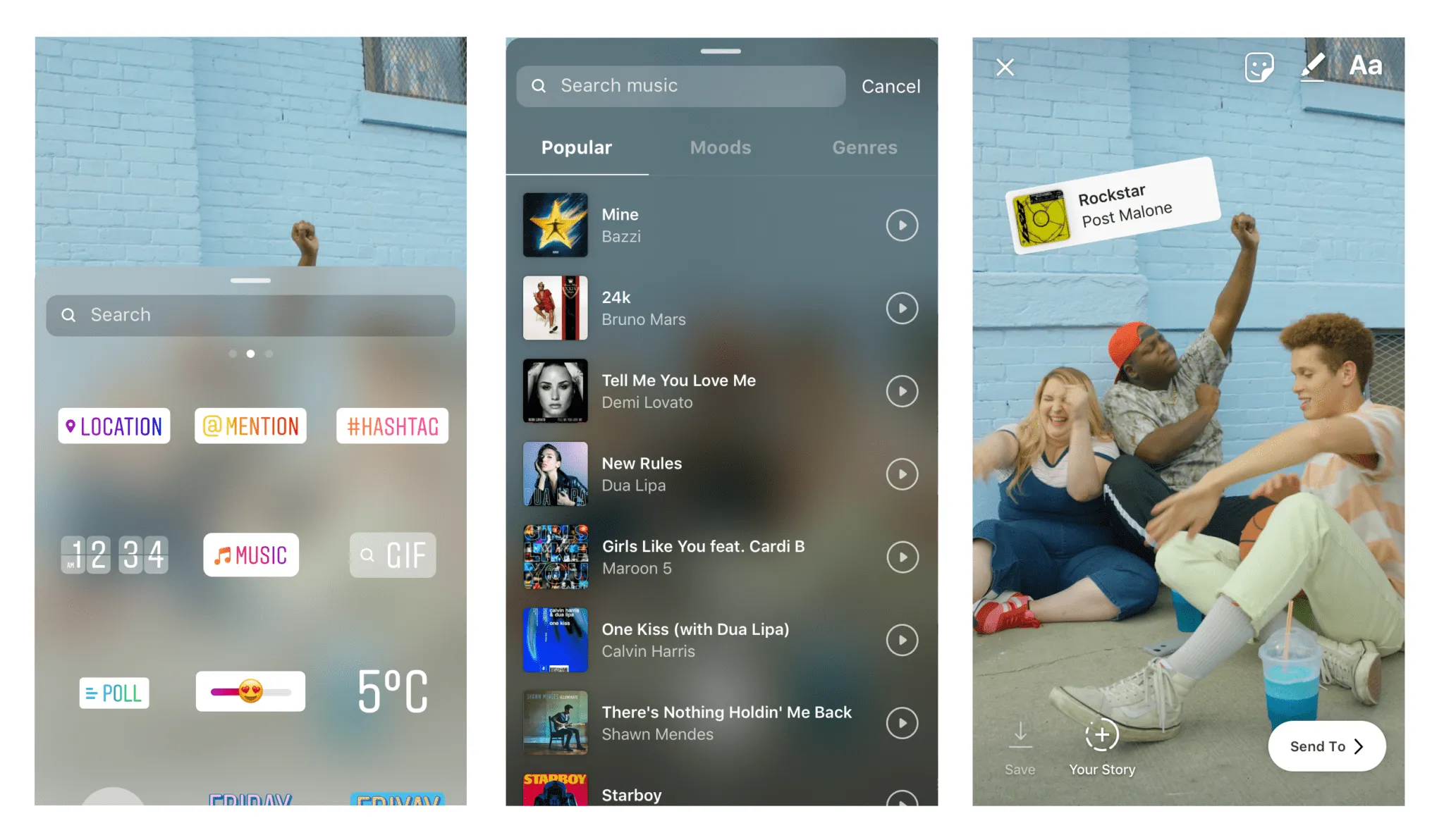
Note that Instagram doesn’t let you play audio pulled directly from third-party music apps. You can still link out to a track on another platform. Here’s how to do that for each of the main services.
How to add Spotify music to Instagram Stories
You can add a link to a song on Spotify to your Story if you’re a Spotify Premium user. Because of Instagram’s licensing terms, the audio won’t play, but the link drives traffic back to the track. Here’s how:
- Open Spotify and find the song you want to share.
- Tap ‘Share’.
- Select ‘Instagram Stories’.
- A pre-formatted Story opens with the song’s artwork and artist name.
- Finish editing your Story and share.
How to add SoundCloud music to Instagram Stories
SoundCloud is where many independent artists release work first, which makes it a strong source for fresh, less-saturated tracks. As with the others, your followers won’t hear the audio, but you can link to the song:
- Open the SoundCloud app and find the song you want to share.
- Tap the share icon.
- Choose ‘Instagram Stories’.
- SoundCloud imports the artwork and artist details.
- Finish editing your Story and post.
How to add Apple Music to Instagram Stories
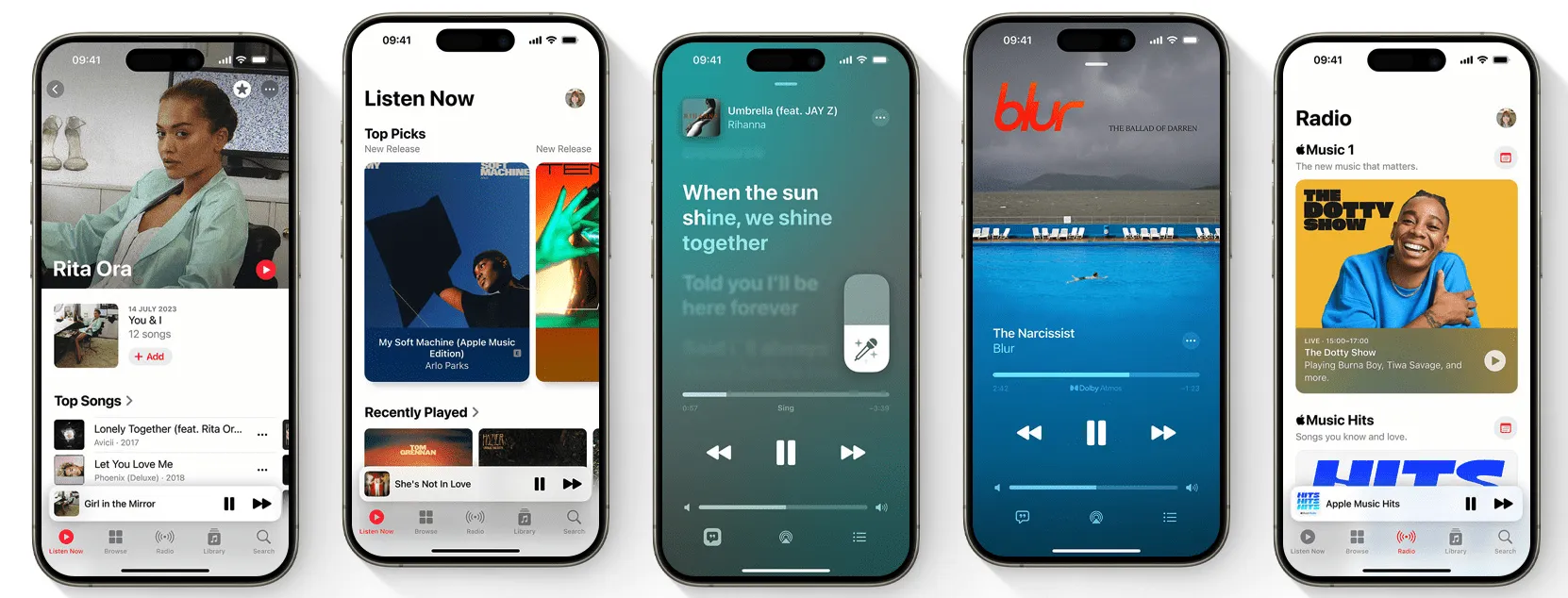
Apple Music carries over 100 million songs. You can share a track’s artwork and artist info to your Story, though again, not the audio. Here’s how to add a link:
- Open the Apple Music app and find the song you want to share.
- Tap the three dots.
- Scroll until you find Instagram and tap the icon.
- The artwork and artist details import automatically.
- Finish editing your Story and post it.
Credit: Apple
How to add Shazam music to Instagram Stories
By now the pattern is clear: you can add a Shazam track to your Story, but without audio. To add the link:
- Open the Shazam app and find the song you want to share.
- Tap the three dots next to the song title and select ‘Share’.
- Choose ‘Instagram Stories’.
- Shazam creates a Story clip with the song’s artwork and artist name.
- Customise it with text, GIFs or stickers before sharing.
Why won’t Instagram let me add music to my Story?
If you can’t add music to a Story, it’s usually one of these:
- Region restrictions. The music feature isn’t available in every country, due to copyright and licensing agreements.
- An outdated app. Older versions glitch, so update Instagram and try again.
- A branded-content setting. Running content as a branded-content partnership can disable the music feature.
- A third-party app. Audio pulled directly from another music app isn’t allowed; you can only link out.
Why can I only see limited music choices on Instagram?
If your music library looks short, it’s likely because you’re on a business account.
Business accounts are restricted to songs cleared for commercial use, because not every track is licensed for commercial accounts. When you open the music section on a business account, you’ll only see commercially cleared songs, so anything you pick is safe to use without breaching copyright.
This matters for brands and creators running sponsored work. Stick to the cleared library and you avoid takedowns and muted Stories.
How to add music to an Instagram post
Music isn’t limited to Stories. Adding a track to an in-feed post can bring a static image or carousel to life. Here’s how:
- Open Instagram and tap the + at the bottom of the screen.
- Select ‘Post’ and choose your image or carousel.
- Tap ‘Next’.
- Tap the music note icon at the top of the screen.
- Search for a song, browse the ‘For you’ suggestions, or filter by genre under ‘Browse’.
- Select the track you want.
- Use the scrollable bar to choose the section of the song.
- Tap ‘Done’.
- Tap ‘Next’.
- Write your caption and share.
Can I add my own music to Instagram Stories and posts?
If you’re a musician and want your own tracks available on Instagram, there are two routes.
First, upload to SoundCloud and share the link to your Story, remembering the audio won’t play.
Second, get your tracks into Meta’s licensed music library through a distributor that delivers to Facebook and Instagram. Once your music is live in the library, other people can use it in their Stories, which is a straightforward way to get your work into circulation and earn royalties.
FAQs
Can people hear the audio when I link a song from Spotify or Apple Music?
No. Because of Instagram’s licensing terms, links from third-party music apps carry the artwork and a tap-through link, but not the playable audio. To have the song actually play in a Story, use Instagram’s in-app music library.
Why do business accounts have fewer songs?
Business accounts are limited to tracks cleared for commercial use. It’s a licensing safeguard. It keeps sponsored and branded content from breaching copyright, which is exactly what you want if you’re a brand or a creator running paid work.
Does adding music actually improve engagement?
Music sets the mood and pace of a Story, which tends to hold attention longer and makes content more memorable. It’s not a guaranteed lift on its own, the track has to fit the content, but used consistently, it’s a real creative lever.
Music is the easy part. Consistency is the system.
Knowing how to add a track to a Story is table stakes. Turning sound, pacing and creative into a signature that performs across hundreds of Stories, and ladders up to measurable growth, is the harder problem, and the one that separates a busy feed from a brand people recognise.
That’s the work we do. Vamp is a tech-enabled influencer marketing agency: we design creator-led growth systems and build the infrastructure behind them, so attention turns into measurable growth instead of one-off posts. Talk to us.