How to sell products on Instagram: a brand's guide

To sell products on Instagram, set up a business account, connect a product catalogue, verify your website, and submit your shop for approval, then drive sales with shoppable posts, story tags and creator-led content.
Instagram is one of the largest discovery-to-purchase surfaces in the world. Since Instagram Shopping launched in 2019, hundreds of millions of people have used it to find and buy products they’d never searched for. The mechanics of setting up a shop are straightforward; the harder part is turning that shop into consistent sales. This guide covers both: the setup, and the tactics that make it perform.
The short version:
- You need an active website, products that meet Instagram’s commerce policies, and to be in an eligible region.
- Setup is free: business account → product catalogue → website verification → submit for approval.
- Selling happens through shoppable posts, product stickers in Stories, Highlights and Reels, not a standalone Shop tab (Instagram removed that in 2023).
- The brands that win aren’t the ones with the slickest catalogue. They’re the ones whose products show up inside content people already trust.

Why sell on Instagram?
With well over a billion monthly users and the vast majority following at least one business account, Instagram is where most brands’ audiences already are. It collapses the distance between discovery and checkout: someone can see a product in a Reel, tap a tag, and buy without leaving the app.
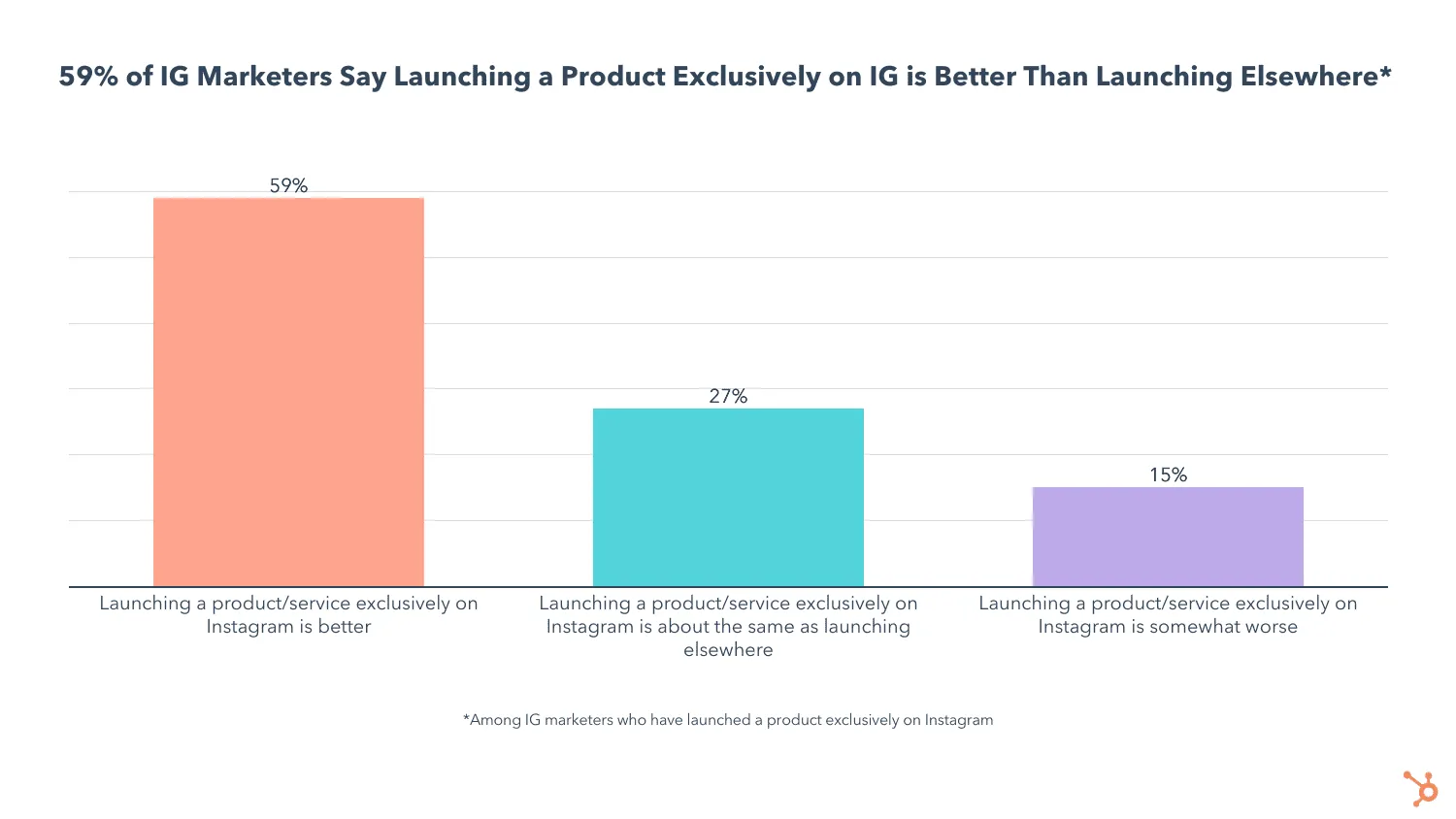 Source: HubSpot
That’s the opportunity, and the trap. The setup is easy enough that a lot of brands stop there, treating the shop as a destination rather than a system. The shop is plumbing. Sales come from the content that points to it.
How to sell products on Instagram
Before you build the shop, confirm you meet Instagram’s three baseline requirements. Get any of these wrong and your application is rejected:
- An active website with real products. Instagram works with established businesses, so you need a live online presence before you proceed.
- Compliance with Instagram’s commerce policies. Review them properly. Most rejections trace back to a policy breach.
- Operating in an eligible region. Instagram Shopping isn’t available everywhere; check your market is supported.
How do I set up an Instagram shop?
Once you meet the criteria, setup runs through Meta’s tools and takes a few business days to approve. The steps:
- Switch to a business account. It’s free, go to Settings → Account type → Switch to professional account.
- Connect your shop through Commerce Manager. Set up Instagram Shopping inside the Meta Business Suite, which is where Meta now manages catalogues and shops.
- Set up your catalogue. Add your products in Commerce Manager. If they’re already listed on a third-party ecommerce platform like Shopify or WooCommerce, connect that catalogue rather than re-entering everything by hand.
- Add and verify your website. Instagram requires a live, active website, so include it here and complete Meta’s domain verification process.
- Set up checkout (selected regions). Where available, checkout lets customers buy directly in-app during launches or casual browsing.
- Submit for approval. Send your shop for review and wait for Instagram’s sign-off. This usually takes a few business days.
How to sell on Instagram: the tactics that convert
A live shop is the starting line, not the finish. These are the formats that actually move product.
Create shoppable posts
Shoppable posts are the most direct route from discovery to purchase. They support product tags that work like tagging a person, except the tag surfaces the price and takes the viewer straight to checkout. Tag products in feed posts, Reels and carousels so a sale is always one tap away.
Use product stickers in Stories
Stickers drive engagement on regular Stories, and they do the same job for product Stories. A product sticker links viewers directly to the item, so a quick behind-the-scenes Story can double as a shoppable moment.
Post when your audience is active
Posting time still matters for reach, and behaviour varies by market. Use your own account insights to find when your audience is online rather than relying on a generic global “best time”, then schedule your most commercial content into those windows. (For the full method, see our guide to the best time to post on Instagram.)
Make use of Story Highlights
Stories disappear after 24 hours, but Highlights let you pin the best ones beneath your profile photo. Build Highlights for best-sellers, new collections or product FAQs so the items you most want to push stay visible long after the Story expires.
Get creative with your content
Don’t just shoot products in flattering light. Take the audience somewhere. Behind-the-scenes footage of how something is made, teaser content before a launch, honest reviews and styling ideas all outperform a clean product shot, because they give people a reason to care before they buy. Test formats and let the response tell you what works.
Use Instagram Live
Live remains one of the strongest formats for ROI, follower growth and brand awareness, so build it into your selling. Note that Instagram retired live shopping (product tagging during streams) in March 2023, but you can still use Live to demo products, host guests, and run Q&As that send viewers to your shop afterwards.
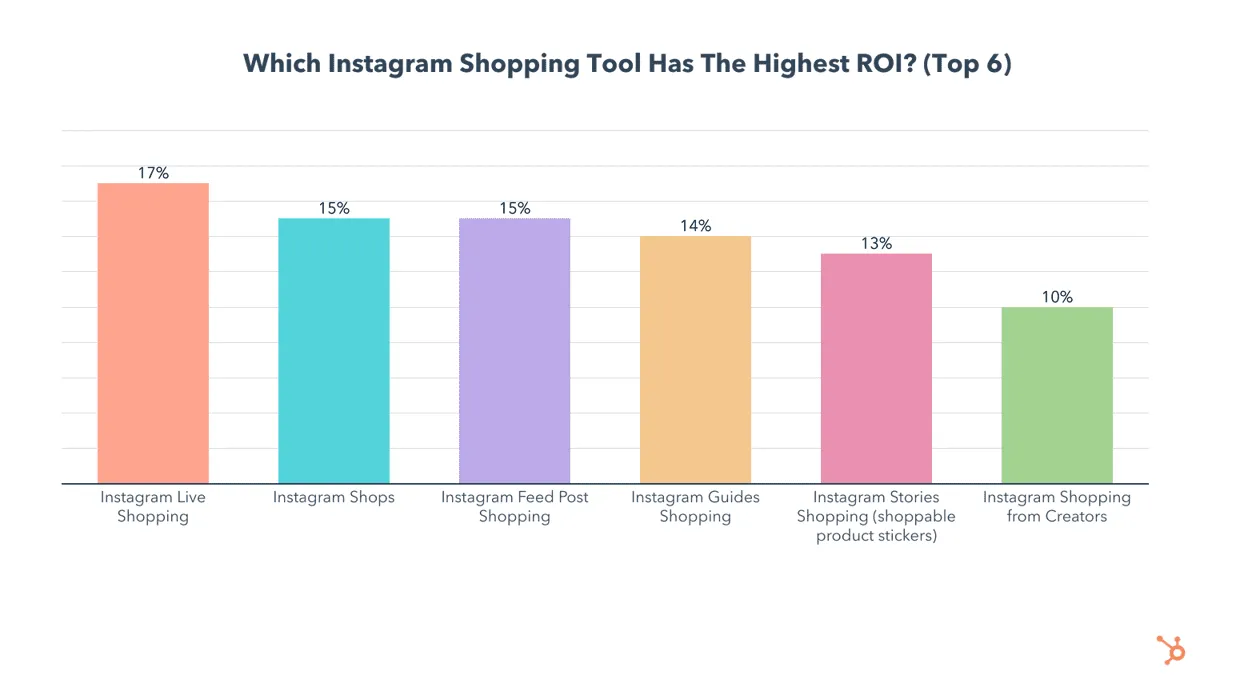
Are there fees to sell on Instagram?
Instagram doesn’t charge a fee to set up a shop or list products, which makes it accessible to businesses of any size. Where in-app checkout is available, Meta may apply a selling fee per transaction, and any third-party ecommerce platform you connect will charge under its own terms.
How we see it: the shop is the easy part
Setting up an Instagram shop is a few hours of admin. Selling consistently is the real work, and it rarely comes from the brand account alone.
The brands that convert on Instagram are the ones whose products appear inside content people already trust: creators their audience follows, formats that feel native, recommendations that don’t read as ads. A shop tag inside a creator’s Reel converts because the trust is already there. That’s the difference between a catalogue people can buy from and a system that makes them want to.
How to sell on Instagram without a website
You can’t, in any reliable way. Instagram prioritises legitimate, established businesses, so Instagram Shopping requires a website with purchasable product listings. If you don’t have one yet, that’s the prerequisite to solve before anything else. A simple ecommerce site connected to your catalogue is enough to qualify.
How to add products to an Instagram shop
Add products through your connected Facebook catalogue or your third-party ecommerce platform (Shopify, WooCommerce and similar). In Commerce Manager, open the catalogue and choose Add items.
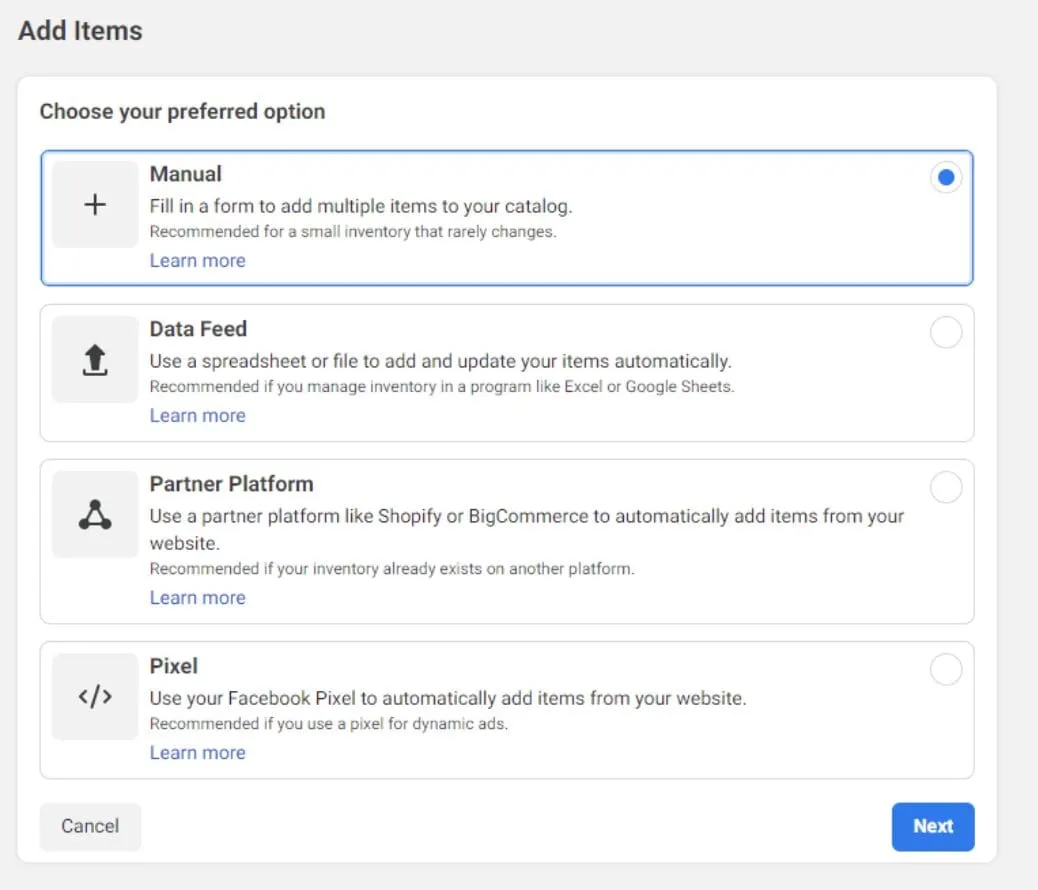
From there you can add products manually, via spreadsheet, or by integrating your ecommerce platform. Pick whichever applies and follow the steps. You can also control which products appear in your shop, or hide items you no longer want to show.
Where is the Instagram Shop button?
Instagram removed the dedicated Shop tab from the app’s navigation in 2023, so there’s no longer a shopping-only home for products. Shopping still works. Brands promote products through Reels, Stories and feed posts. A View shop button appears on your profile, where visitors can browse your collections and products.
How do I accept payment on Instagram?
Where in-app checkout is supported, customers pay via Meta Pay, which stores their card and details once for use across Facebook, Instagram and Messenger. Instagram accepts major credit cards, Visa, Mastercard, American Express and Discover, and PayPal. Outside checkout regions, product tags send shoppers to your own website to complete the purchase.
Do I need a trade licence to sell on Instagram?
Instagram doesn’t require a trade or business licence, provided you meet its commerce eligibility criteria:
- Comply with its commerce policies
- Represent your business and domain accurately
- Operate in a supported market
- Demonstrate trustworthiness
- Provide accurate information and follow best practices
How many followers do you need to open an Instagram shop?
None. Instagram doesn’t set a follower minimum. As long as you meet the eligibility criteria above and run a legitimate business, you can open a shop with zero followers. Followers help you sell; they aren’t a gate to setting up.
FAQs
How do I measure the success of my Instagram shop?
Focus on the metrics that map to revenue: conversion rate (how many visitors buy), click-through rate from posts to your shop (how well your content drives intent), and average order value. Use Instagram’s built-in insights for the basics, and connect a third-party analytics tool if you want to attribute sales back to specific posts, creators or campaigns.
How do I drive traffic to my Instagram shop from other platforms?
Cross-promote where your audience already is. Tailor content for each channel, Facebook, Pinterest, TikTok, email, with a clear call to action pointing to your Instagram shop. Email campaigns featuring shoppable products work well, and creator collaborations are among the most effective ways to send a warm, relevant audience straight to your products.
What mistakes should I avoid when setting up an Instagram shop?
The big ones: breaching commerce policies (the most common cause of rejection), low-quality or misleading product images and descriptions, and failing to tag products in posts and Stories, which makes them undiscoverable. Keep the catalogue current and check regularly for issues so the buying experience stays smooth.
Set up the shop. Build the system that sells.
Setting up an Instagram shop is the easy, repeatable part. Most brands can do it in an afternoon. Turning it into sustained sales is the harder, more valuable problem, and it’s almost always solved in content rather than catalogue settings: the right creators, the right formats, products surfaced where trust already lives.
That’s the work we do. Vamp is a tech-enabled influencer marketing agency. We design creator-led growth systems and run the content engine behind them, so social commerce becomes measurable growth instead of a shop nobody visits. Talk to us.