Retargeting ads: what they are and how to set them up

Retargeting ads are paid ads shown to people who already engaged with your brand, visited your site, viewed a product, watched your content, to bring them back and convert them.
Most first-time visitors leave without buying. According to Mailchimp, only about 3% of people who visit an e-commerce site for the first time make a purchase. Retargeting ads are how you reach the other 97%, the warm audience that already knows you, and give them a reason to come back.
This guide covers what retargeting ads are, how they work, how to set them up on Facebook, Google and LinkedIn, and, the part most guides skip, how to make creator content the engine that feeds them.
The short version:
- Retargeting ads target people who’ve already shown intent, so they convert harder than cold ads.
- They’re powered by a pixel on your site or a list of contacts you upload.
- It takes roughly seven touchpoints to convert a cold lead. Retargeting is how you stay in view across them.
- The strongest retargeting creative isn’t a banner. It’s the creator content that earned the click in the first place.
What are retargeting ads?
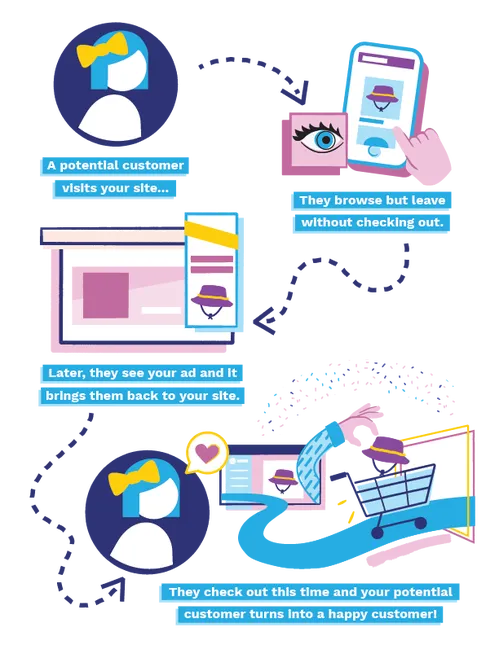
Retargeting ads are aimed at people who’ve already shown an interest in your brand, usually by visiting your website. Retargeting uses tracking codes to recognise those visitors as they browse elsewhere, then shows them ads designed to pull them back.
The logic is simple: attention is rarely a single moment. It takes around seven touchpoints to turn a cold lead into a customer, so retargeting keeps your brand in view across that journey instead of betting everything on one visit.
Retargeting vs remarketing: what’s the difference?
The two terms get used interchangeably, but there’s a useful distinction.
Retargeting focuses on people who’ve visited your site but haven’t converted. They see your ads later, on social, in their inbox or across the web, nudging them back.
Remarketing re-engages people who’ve already converted, newsletter subscribers, past purchasers, usually through email. It’s about lifetime value, not first conversion.
In practice most brands run both. One brings people back; the other keeps them.
How do retargeting ads work?
Retargeting is powered in two ways: it’s either pixel-based or list-based.
Pixel-based is the most common. A small piece of JavaScript, the “pixel”, sits on your website and drops a cookie in the browser of anyone who visits. That signal tells the ad platform to serve your ads to that person once they’ve left your site and are browsing elsewhere.
List-based uses contact details you already hold. You upload a list, say, to Meta, and the platform matches those email addresses to its users and shows them your ads.
Pixel-based is best for catching anonymous browsers in the act. List-based is best for reaching people you already have a relationship with.
Why use retargeting ads?
Retargeting earns its place because it works on warm audiences, people already primed to act. According to HubSpot, brands use it to:
- Reinforce awareness, re-engage visitors with products, features or relevant information.
- Drive conversions, move people to the next step in the funnel.
- Recover sales, turn warm leads into buyers or sign-ups.
- Increase customer lifetime value, grow what each customer is worth over time.
- Reduce cart abandonment, remind people what they left behind.
- Introduce new products, surface launches to an audience that already knows you.
Combined with an existing advertising strategy, Google reports retargeting can drive up to 50% more conversions.
To sharpen who you target and why, social media analytics and a customer journey map are the groundwork worth doing first.
What does a good retargeting ad look like?
According to WordStream, the best retargeting ads are built for the retargeting audience specifically, not just a strong ad in general, but the right ad for a group of people who already know you. Their proven angles:
- Overturn a sales objection.
- Showcase products the audience has already viewed.
- Create a sense of urgency to prompt action.
- Offer a discount code or coupon.
- Nudge buyers to complete checkout.
- Cross-sell to existing customers.
- Remind past customers why they chose you.
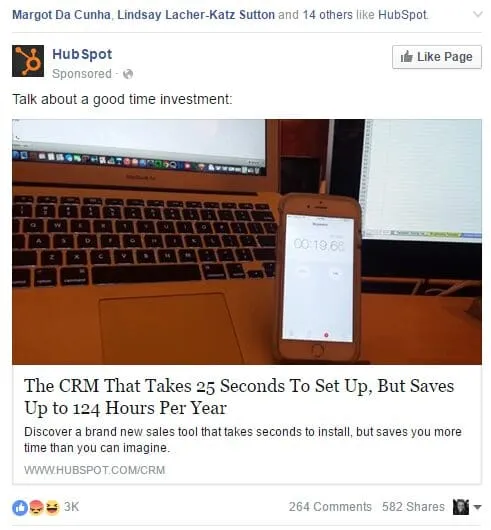
This HubSpot ad, placed on Facebook, targets people already familiar with the product who may have stalled on the assumption it takes a long time to set up. By naming that exact objection, it does the job a generic ad never could.
What is a retargeting strategy?
Retargeting works best inside a wider strategy, across more than one channel. A simple, effective flow (recommended by Mailchimp):
- Drive traffic to your site, through a social ad, influencer marketing or email.
- If they leave without converting, retarget them with an ad.
- When they do convert and you capture their email, follow up with a welcome message.
The first step is the one most brands under-invest in. Retargeting can only re-engage the audience you’ve already built, so the quality of that audience decides the ceiling on everything downstream.
How to feed your retargeting ads with creator content
This is where most retargeting strategies leave value on the table. Your influencer marketing and your retargeting shouldn’t run in separate lanes. They should feed each other.
Here’s how we see it. Influence isn’t a separate channel from performance; it’s the top of the same system. Creator content earns the initial visit, the moment the pixel fires, and the same content is your strongest retargeting creative, because it’s what won the audience’s attention in the first place.
The mechanics:
- Use creator content to drive qualified traffic to specific products or pages, so the pixel tags a high-intent visitor.
- Retarget those visitors with the same creator content, matched to what they looked at.
- A beauty brand, for example, can build tutorial content with relevant creators around specific skin types, then serve that exact content as retargeting creative to people who viewed those products.
A polished brand banner asks a stranger to trust you. A creator they already engaged with carries credibility the banner never will. When creator content and retargeting are built as one system rather than two campaigns, the warm audience converts on a voice it already recognises.
For more on building that top of funnel, see our guide to Instagram marketing and our guide to social media management tools.
Credit: AdRoll
Which platforms can you run retargeting ads on?
Most major social platforms support retargeting, including LinkedIn, X and Facebook, alongside a range of third-party tools:
- Mailchimp, pairs retargeting with email and social campaigns.
- AdRoll, uses customer data to power retargeting and integrates with HubSpot.
- ReTargeter, builds customisable retargeting campaigns.
- Criteo, uses existing customer data to find the best channels for your ads.

How do you set up retargeting ads on Facebook?
To run a retargeting campaign on Facebook (Meta), you can either upload a list to build a custom audience, or install Meta’s pixel on your website so it can track your visitors. Pixel installation is best handled by a web engineer or a paid-media specialist.
Once the pixel is collecting data, build a custom audience:
- Go to Audiences.
- Choose Custom audience.
- Select Website traffic.
- When you launch your campaign, switch retargeting on so Meta serves your ad to the right segment.
How do you set up retargeting ads on Google?
You can set up a retargeting campaign in Google Ads using a tag installed on your website, letting you target specific sets of visitors, for example, people who viewed a particular product page.
To create the audience tag:
- Sign in to Google Ads.
- Open Tools.
- Go to Audience source.
- Choose Set up an audience.
- Click Set up tag in the Google Ads tag section.
- Choose whether to collect general website data or more specific on-site behaviour.
- Select Install the tag yourself.
- Under global site tag, copy in your Google Ads ID.
- Copy the code you’re given and paste it into your site wherever you want to track and retarget visitors, your developer can handle this quickly.
- Click Continue, then Done.
- Add Google Tag Manager so you can update tags easily later.
To set up a retargeting display campaign:
- Sign in to your Google Ads account.
- Create a new campaign.
- Pick the most relevant goal.
- Select Display as the campaign type.
- Name the campaign and set location, language, bidding and budget.
- In the targeting section, choose automated or manual audience segments.
- Use optimised targeting to let Google find the highest-performing segments.
- Click Done, build your display ads, and launch.
How do you set up retargeting ads on LinkedIn?
- Install the LinkedIn Insight Tag on your ad account and paste it into your site, just before the closing
</body>tag in the global footer. - The Insight Tag then appears under Account Assets in Campaign Manager. It can take up to 24 hours to show.
- Make sure your ads serve correctly in Chrome by setting the SameSite attribute to None and adding the Secure label to your cookies. Your developer may need to do this.
Once your audiences are built, get the most from LinkedIn retargeting by:
- Refining ad content over time.
- Testing multiple ad formats to see what performs.
- Staying flexible. If something isn’t working, change it.
Retargeting display ads
Display ads are the image-and-text boxes that appear as you browse the web, usually carrying a link to buy or learn more. Image quality and sizing make or break them. Get the dimensions right and the creative sharp. Google’s display ad image guidelines are the reference to follow.

Retargeting ads FAQs
How do you measure the success of a retargeting campaign?
Focus on a handful of KPIs: click-through rate (CTR), conversion rate, return on ad spend (ROAS) and cost per acquisition (CPA). Together they tell you whether retargeting is driving conversions at a return that justifies the spend. Watch frequency too. Serve the same ad too often and you risk ad fatigue.
What are the risks of retargeting ads?
The main one is ad fatigue: see the same ad too many times and people tune out, or worse, sour on the brand. Aggressive retargeting can also feel invasive, which is a privacy and perception risk. And without proper audience controls, you can burn budget chasing people who were never going to convert. Frequency caps and tight segmentation keep all three in check.
How effective are retargeting ads?
WordStream reports that retargeting ads are 76% more likely to be clicked than standard display ads, the upside of advertising to an audience that already knows you.
How can a small business use retargeting on a limited budget?
Tightly segment your audiences so spend reaches only the most relevant people, set frequency caps to avoid overexposure, and start with a small, testable campaign on a budget-friendly platform like Google Ads or Meta. Strong, behaviour-specific creative does the rest, and the cheapest place to find that creative is the content your creators already made.
Retargeting brings people back. A system is what makes them worth bringing back.
Getting the pixel right and the platform set up is table stakes. The harder, more valuable problem is the audience feeding the funnel: building one warm, qualified and primed enough that retargeting has real intent to work with.
That’s the work we do. Vamp is a tech-enabled influencer marketing agency: we design creator-led growth systems where influence and performance run as one model, so the content that earns the first click is the same content that closes the second. Talk to us.