Social media image sizes: the complete 2026 guide
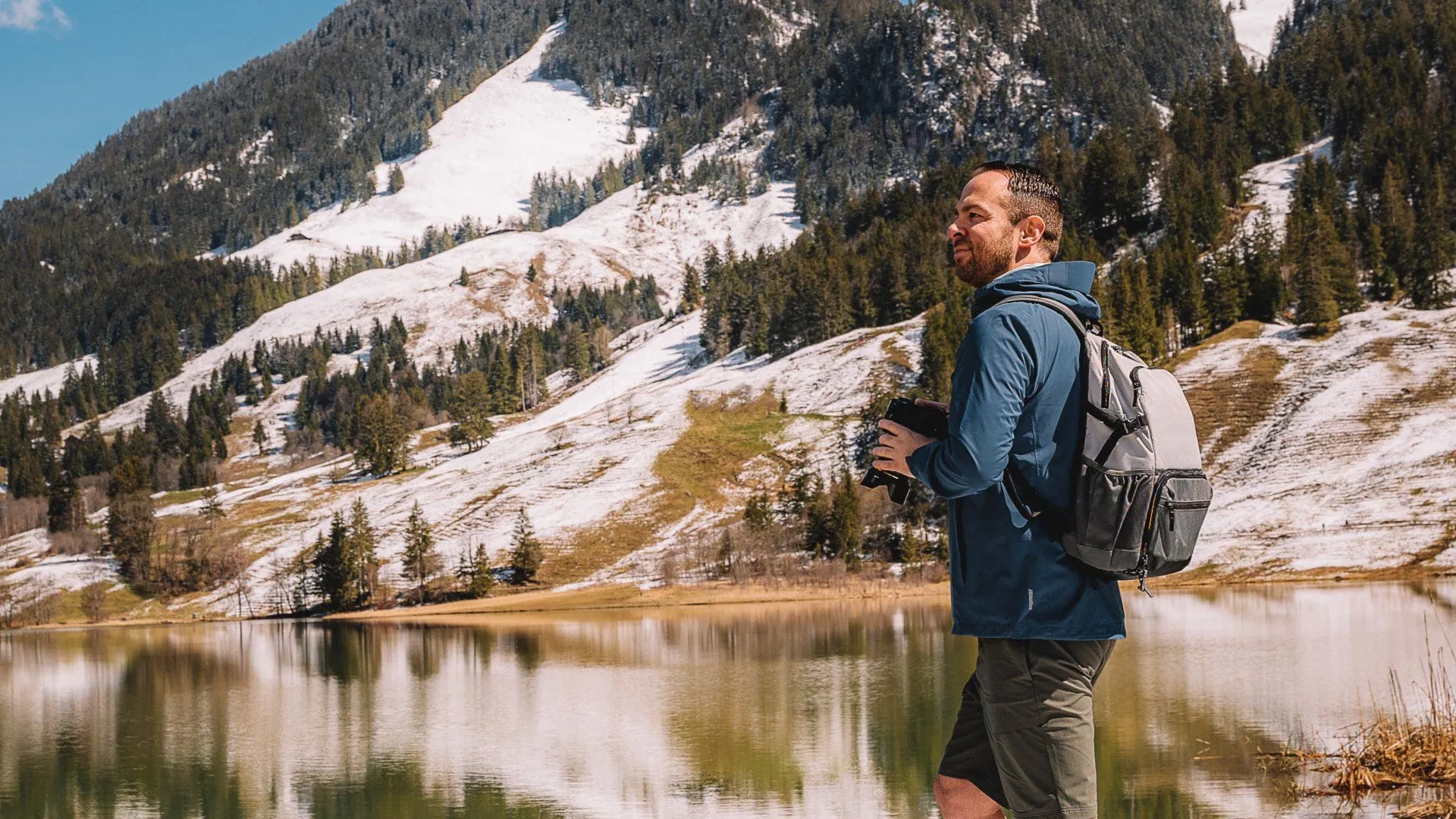
The complete, up-to-date list of social media image sizes: every platform, every placement, in one reference.
Social media image sizes are the pixel dimensions and aspect ratios each platform uses to display your images cleanly. Get them right and your content looks sharp and intentional. Get them wrong and the platform crops, compresses or stretches the work until it looks amateur. This guide gives you the current dimensions for every major channel, plus the rules that make resizing predictable.
Platforms change these specs often, usually quietly, around redesigns or new content formats. The sizes below reflect 2026 guidance. Bookmark the page and check the relevant section before a big push.
The short version:
- There is no single “social media size”. Each platform favours a different ratio: square, portrait or landscape.
- Vertical (9:16) now dominates feeds and Stories across Instagram, TikTok, YouTube Shorts and Snapchat.
- Always export at the recommended size before you upload. Platform auto-resizing is where quality goes to die.
- Keep the important part of the image inside the safe zone, because mobile crops more aggressively than desktop.
What size should social media images be?
It depends on the platform and the placement. Each network has its own set of requirements, and most support several at once: a profile photo, a cover image, a feed post and an ad each have different dimensions.
The reliable approach is to design to the platform’s native ratio, export at the recommended pixel size, and keep critical elements (faces, logos, text) away from the edges. When you do that, the automatic resize has nothing to ruin.
What resolution is best for social media?
There is no one-size-fits-all resolution, because each platform resizes differently. What matters is uploading at or above the recommended dimensions so the platform compresses down rather than stretching up. Stretching is what makes images look soft.
Resolution refers to the number of pixels in an image. More pixels means more detail. Drop too low and the image becomes pixelated, losing the sharpness that makes branded content read as professional. As SmartFrame explains, resolution is expressed as a horizontal x vertical measurement, the higher the numbers, the higher the resolution. Export to the right size before you upload (resizing tools are covered further down).
How we see it: dimensions are the floor, not the finish line. Consistent ratios, deliberate framing and a recognisable visual system are what turn a feed of correctly-sized images into a brand people remember. The spec gets you in the door; the system is what compounds.
Below is the run-down of image sizes for the best-known platforms.
Instagram image sizes
Instagram is a visual-first channel, so sizing precision matters more here than almost anywhere. The feed has standardised around a taller frame, and 9:16 vertical now owns Stories and Reels.
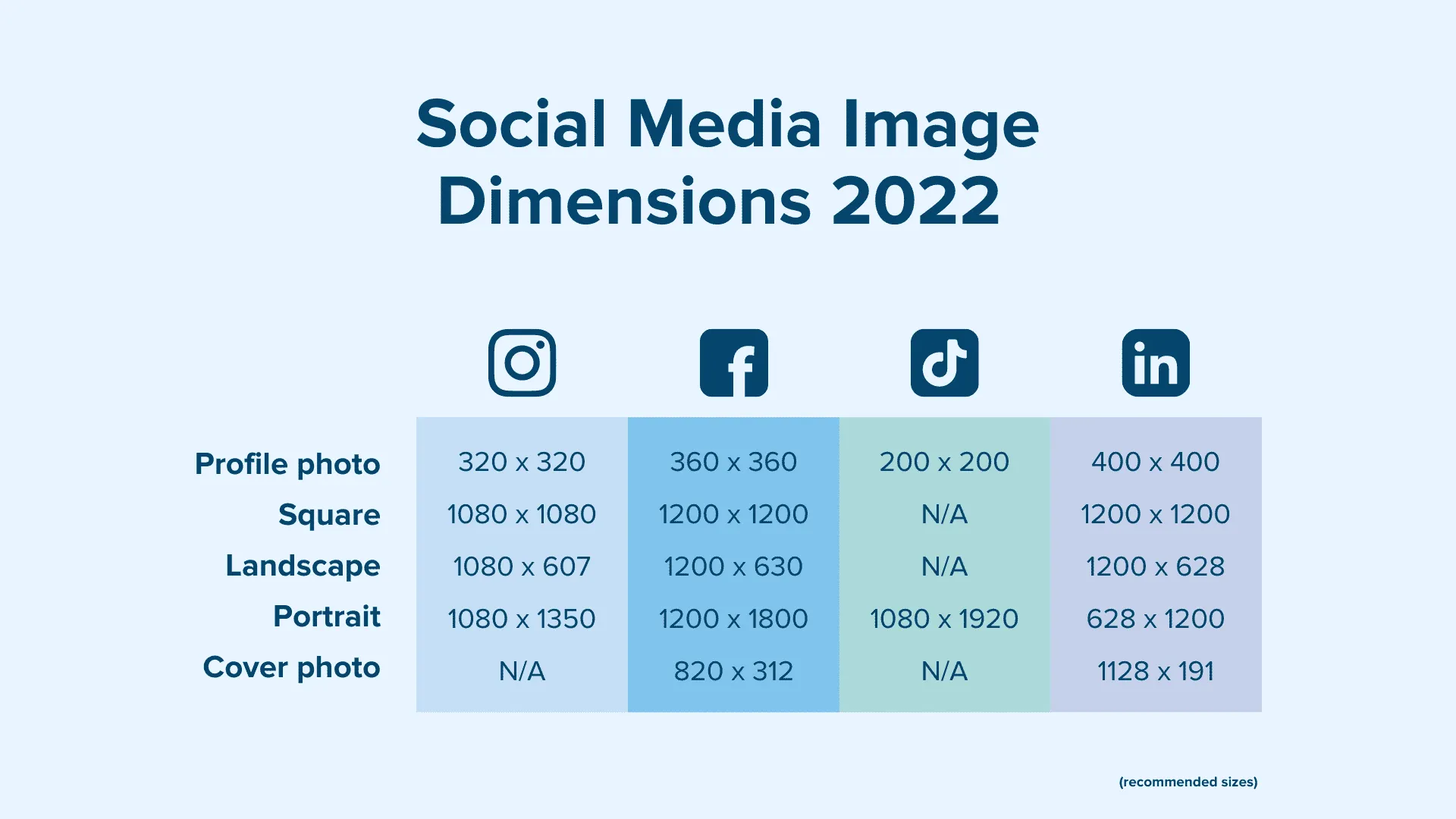
- Profile picture – 320 x 320 pixels (displayed as a circle)
- Square feed post – 1080 x 1080 pixels (1:1)
- Portrait feed post – 1080 x 1350 pixels (4:5, the recommended feed ratio)
- Landscape feed post – 1080 x 566 pixels (1.91:1)
- Stories and Reels – 1080 x 1920 pixels (9:16)
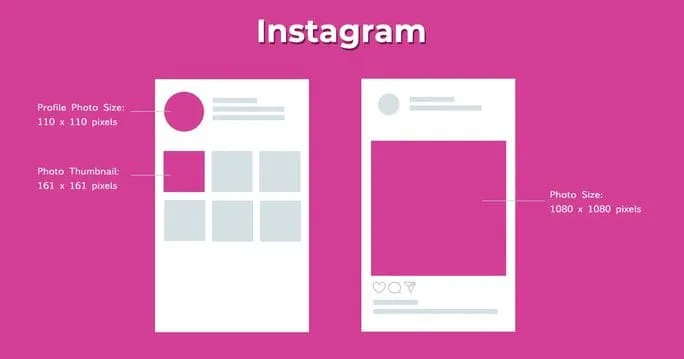
Reels and Stories share the same 1080 x 1920 frame. Reels are cropped to a tighter ratio on the profile grid, so keep key elements centred. For deeper Instagram strategy, see our Instagram marketing guide.
What size JPEG is best for Instagram?
Feed photos should be at least 1080 pixels on the shorter side. For a portrait post that means 1080 x 1350; for a square, 1080 x 1080. Upload JPEGs at high quality to keep compression artefacts down.
Facebook image sizes
Facebook photos carry a lot of brand weight, and the platform shows different crops on desktop and mobile, so it pays to get the framing right.
- Profile photo – 320 x 320 pixels (displays as 170 x 170 on desktop, 128 x 128 on mobile)
- Cover photo – 851 x 315 pixels (displays smaller on mobile)
- Shared/link image – 1200 x 630 pixels (1.91:1)
- Event cover image – 1920 x 1005 pixels
- Group cover photo – 1640 x 856 pixels
- Facebook feed ad – 1080 x 1080 pixels (1:1) or 1200 x 628 pixels
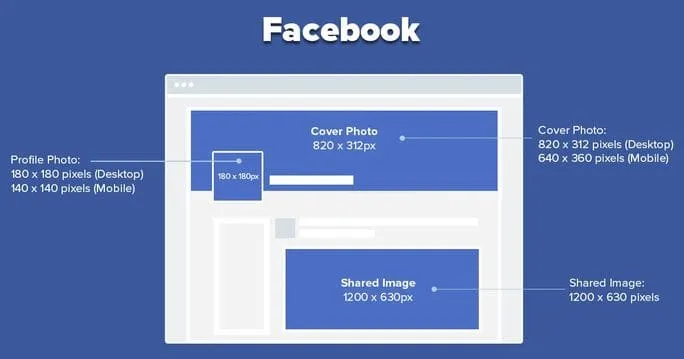
Mobile and desktop crops differ, so keep the main subject of any cover image within the central safe zone, otherwise it gets clipped when the platform resizes. Social Pilot suggests centring important elements well inside the cover frame to survive both crops.
X (formerly Twitter) image sizes
On a fast-moving feed, image quality is what makes a post stop the scroll. Use separate images for the profile and the header.
- Profile photo – 400 x 400 pixels (under 2 MB)
- Header/cover photo – 1500 x 500 pixels (under 5 MB)
- In-feed shared image – 1600 x 900 pixels (16:9)
- File size – up to 5 MB for photos, 15 MB for GIFs
- Supported file types – JPEG, PNG, GIF, WebP
- You can attach up to four images per post
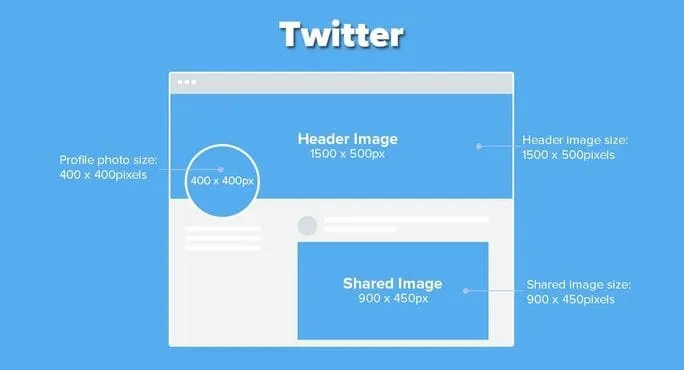
Brandwatch recommends uploading at the maximum supported size to future-proof posts against display changes.
LinkedIn image sizes
LinkedIn is a professional network, so tone and polish matter. Your banner and profile image set the first impression. A properly lit, professionally shot photo is worth the cost.
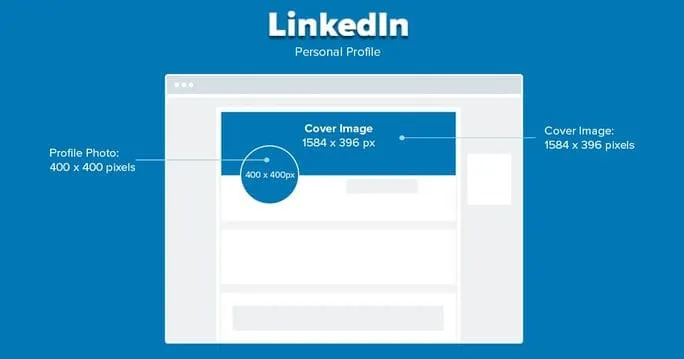
Personal profile
- Profile photo – 400 x 400 pixels
- Background/cover image – 1584 x 396 pixels
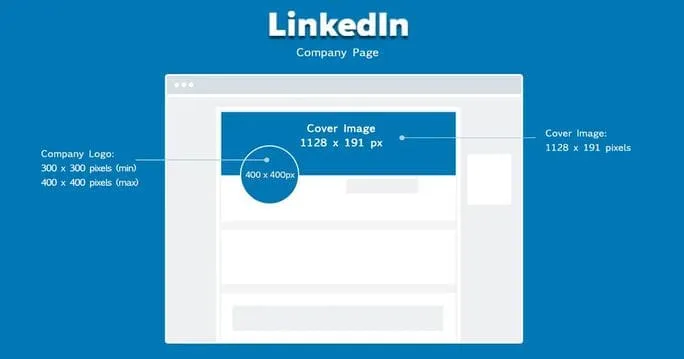
Company page
- Logo – 300 x 300 pixels (up to 400 x 400; max 4 MB)
- Cover image – 1128 x 191 pixels
- Shared post/link image – 1200 x 627 pixels
- Supported file types – JPEG, GIF, PNG (up to 10 MB)
TikTok image and video sizes
TikTok is video-first, and vertical is non-negotiable. According to Hootsuite, the core specs are:
- Video resolution – 1080 x 1920 pixels (9:16)
- Profile photo – at least 200 x 200 pixels (1:1; go larger and keep it square)
- In-feed image post – 1080 x 1920 pixels
The ideal aspect ratio for TikTok is 9:16, which fills the full screen and gives content the most room to perform.
YouTube image and video sizes
For YouTube, both your channel art and your video files need to be sized correctly to display cleanly across TVs, desktops and phones.
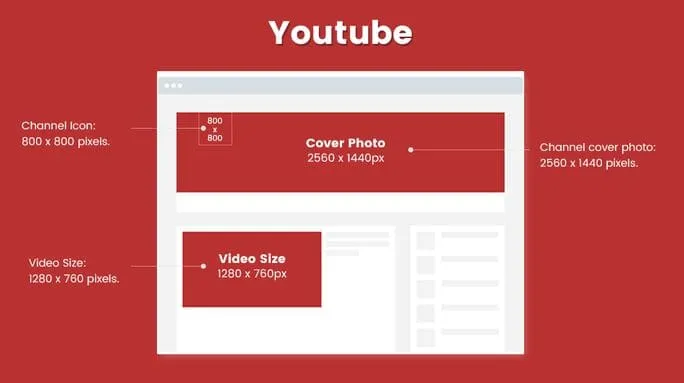
- Channel banner/cover – 2560 x 1440 pixels (keep the logo and text within a 1546 x 423 safe area)
- Channel icon – 800 x 800 pixels
- Video thumbnail – 1280 x 720 pixels (16:9)
Video uploads (16:9):
- 4K – 3840 x 2160 pixels
- 2K – 2560 x 1440 pixels
- 1080p (HD) – 1920 x 1080 pixels
- 720p (HD) – 1280 x 720 pixels
- 480p – 854 x 480 pixels
- 360p – 640 x 360 pixels
YouTube Shorts: 1080 x 1920 pixels (9:16). The maximum upload file size is 256 GB.
Pinterest image sizes
Pinterest rewards tall, vertical imagery, and your profile image should tie back to your brand.
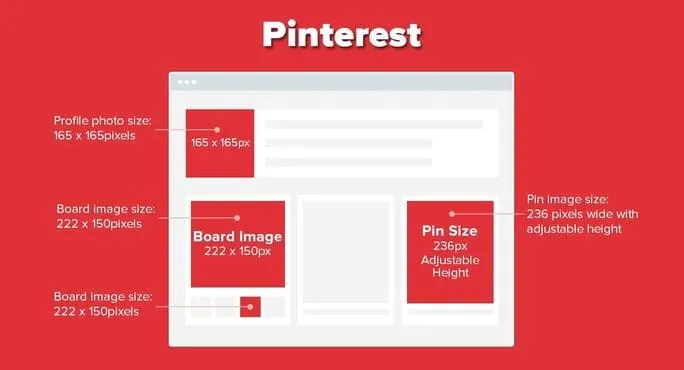
- Profile photo – 165 x 165 pixels
- Standard pin – 1000 x 1500 pixels (2:3 recommended)
- Board cover – 222 x 150 pixels
Pinterest supports JPEG and PNG. Social Pilot recommends the 2:3 ratio as the safest bet for pins.
Snapchat image sizes
According to Hootsuite, Snapchat works to a full-screen vertical frame:
- Ad/Snap image – 1080 x 1920 pixels (9:16)
- Geofilter image – 1080 x 2340 pixels
- File types – JPEG or PNG (max 5 MB)
Other platforms
- WeChat – cover and profile specs are revised periodically, so confirm the current dimensions in the Official Account editor before you design.
- Tumblr – profile 128 x 128 pixels; post images up to 1280 x 1920 pixels; files under 10 MB, per Social Pilot.
- Google Business Profile – recommended 720 x 720 pixels; minimum 250 x 250 pixels; JPEG or PNG under 5 MB, per Sprout Social.
Quick guide to social media photo sizes
Short of time? These are the safe, go-to dimensions for a single image per platform. For anything you post regularly, check the full section above.
| Platform | Recommended image size | Ratio |
|---|---|---|
| Instagram (feed) | 1080 x 1350 pixels | 4:5 |
| Instagram (Reels/Stories) | 1080 x 1920 pixels | 9:16 |
| Facebook (shared image) | 1200 x 630 pixels | 1.91:1 |
| X (in-feed) | 1600 x 900 pixels | 16:9 |
| LinkedIn (shared post) | 1200 x 627 pixels | 1.91:1 |
| TikTok | 1080 x 1920 pixels | 9:16 |
| YouTube (thumbnail) | 1280 x 720 pixels | 16:9 |
| Pinterest (pin) | 1000 x 1500 pixels | 2:3 |
| Snapchat | 1080 x 1920 pixels | 9:16 |
A social media management tool can handle most of this resizing for you and keep a single asset on-spec across every channel.
How do I check the resolution of my photos?
Check the image metadata. On a Mac, right-click the file and select “Get Info”; on a PC, right-click and select “Properties”. Both show the pixel dimensions so you can confirm an image meets the minimum before you upload.
Is JPEG or PNG better for social media?
Both work. According to Idea Marketing, PNG produces a sharper image and supports transparency, which makes it the better choice for logos, graphics and anything with text. JPEG compresses photographs to a smaller file size, so it is usually the practical choice for photo-led feed posts. Modern platforms also accept WebP, which balances quality and file size well.
Does Instagram prefer JPEG or PNG?
According to Wastedtalentinc, Instagram prefers JPEGs but also supports PNGs, BMPs and non-animated GIFs. For photographs, a high-quality JPEG is the safe default; for graphics with text or transparency, use PNG.
How do I resize a photo to fit social media platforms (free and paid)?
If a photo doesn’t fit a platform’s dimensions, you can resize it quickly with the right tool. These cover most needs:
- Adobe Express – free; upload a JPEG or PNG, choose a resize template and download.
- Resizing App – free, fast and offers a range of resize options, recommended by Lifewire.
- Image Size – free app for Android and iPhone with pixel and aspect-ratio controls.
- BeFunky – resize plus layers, filters and effects (paid plans available).
- Canva – template-based design with preset social dimensions for every platform.
FAQs
How often do social media platforms update their image size requirements?
Frequently, usually several times a year, often alongside redesigns or new content formats. The biggest shifts tend to follow new placements (Reels, Shorts, vertical feeds). Check each platform’s official guidance, or a reputable tracker, before a major campaign rather than assuming last year’s specs still hold.
What’s the safest single image size if I only export one version?
For most 2026 feeds, 1080 x 1350 pixels (4:5 portrait) is the most versatile starting point. It suits Instagram and Facebook well and crops cleanly elsewhere. For anything vertical-first (TikTok, Reels, Stories, Shorts, Snapchat), export at 1080 x 1920 pixels (9:16).
How do I keep image quality consistent across devices and screen sizes?
Export at high resolution, use PNG or high-quality JPEG, and keep key elements inside each platform’s safe zone so mobile crops don’t clip them. Compress sensibly with a tool like TinyPNG or ImageOptim to balance quality and load time, and spot-check the result on a phone before you publish.
The size is table stakes. The system is the advantage.
Knowing every platform’s dimensions is necessary, not differentiating. Every brand can look up a pixel count. The harder, more valuable work is building a content and creator system where the right assets, in the right ratios, reach the right audiences and actually perform. Get your social media strategy and analytics working together first.
That’s the work we do. Vamp is a tech-enabled influencer marketing agency: we design creator-led growth systems and build the infrastructure behind them, so brand content becomes measurable growth rather than a folder of correctly-sized files. Talk to us.