The best Instagram tools for marketers and creators
The best Instagram tools are the ones that match a specific job, scheduling, analytics, design, video, hashtags or ads, not the ones with the longest feature list.
Instagram still carries more than 2 billion monthly active users, which keeps it central to most influencer and digital marketing strategies. But the platform rewards consistency, and consistency is an operations problem. The right Instagram tools take the friction out of that work: planning posts, measuring what lands, editing images and video, and surfacing the hashtags that actually pull. Some are free, some are paid. This guide groups them by the job they do, so you can pick on intent rather than wade through a feature list.
The short version:
- Pick tools by the job, scheduling, analytics, design, video, hashtags, ads, ecommerce, not by who has the most features.
- Free tools (Instagram Insights, Meta Business Suite, Canva, Snapseed) cover a surprising amount before you commit budget.
- Scheduling and analytics are where most teams get the biggest time-back; start there.
- A tool only earns its keep when it changes a decision. The data is the input; the judgement is the work.
What are the best Instagram tools overall?
No single tool does everything well, and the strongest stack is usually a small one. These are the all-rounders worth checking first:
- Tailwind – strong on both Instagram and Pinterest scheduling, with AI content help, post optimisation and a shoppable feed link.
- PromoRepublic – a scheduler that also lets you design images and check analytics, with ready-made social content and templates.
- Iconosquare – built for in-depth analytics and comment management across multiple accounts.
- Metahashtags – does the heavy hashtag research for you.
- Pictory – pulls short clips out of Zoom, Teams and webinar recordings and adds captions, using AI.
- Snapseed – Google’s free photo editor, with a deep feature set for zero cost.
What are the best Instagram scheduling tools?
A scheduling tool lets you plan and queue posts in advance, so you’re not tied to your phone when something needs to go live. The bigger win is rhythm: planning ahead means you can measure, tweak and stay consistent rather than posting reactively.
- Hootsuite Composer – an easy interface with best-time-to-post guidance, an AI hashtag generator, and Canva built in for graphics. Free trial, then paid plans.
- Agorapulse – social management plus light project management, with a mobile app for scheduling on the go. Good for teams.
- Buffer – a clean scheduler for smaller teams, with frequency and best-time suggestions. Free for a limited number of channels.
- Sprout Social – schedules, reports and manages multiple accounts; built for larger teams.
Pair this with our guide to the best time to post on Instagram, then put the same care into writing stronger Instagram captions.
What are the best Instagram analytics tools?
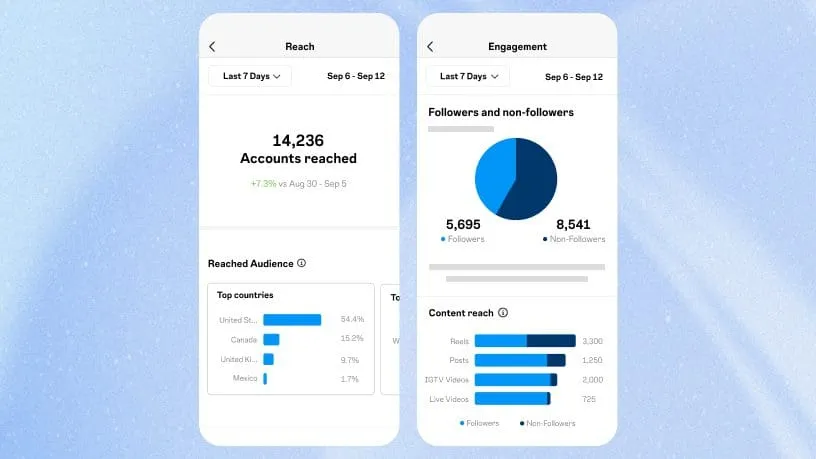
Analytics tell you what’s working so you can re-target and refine rather than guess. Start with the native tools, they cover more than most people expect, then add depth where you need it:
- Instagram Insights – the built-in analytics for professional accounts, with a free overview under the professional dashboard.
- Meta Business Suite – review Instagram metrics alongside ads, posts and stories in one place.
- Minter.io – detailed desktop and mobile insights, tracking audience changes daily.
- Squarelovin – track specific KPIs to see which content is actually performing.
A note on how we read this: reach is the easiest metric to report, so it’s the one that gets reported. Saves, shares and comments are better signals, because they show audiences investing something of their own. If your Instagram reporting still leads with impressions, you’re measuring exposure when you could be measuring influence.
 Source: Instagram
What are the best Instagram ads tools?
Run and measure paid campaigns with these:
- Brand24 – useful metrics for weighing up how an ad campaign is landing.
- Hootsuite Impact – heavyweight analytics, competitor benchmarking and customer-journey measurement across tools.
- Ads Manager – the free platform inside Instagram and Facebook for running, targeting and measuring campaigns, including cost per result.
For the strategy behind the spend, read our guide to Instagram advertising.
What are the best Instagram hashtag tools?
Hashtag research is slow done by hand; these tools find relevant ones in seconds:
- AllHashtag – a free tool that generates and analyses relevant hashtags.
- Best Hashtags – another free option: type your subject, search, copy across.
- Keyword Tool – surfaces trending and popular hashtags.
To sharpen the posts those hashtags sit on, put real thought into your Instagram captions.
What are the best Instagram Stories tools?
To make lighter work of Stories, try these:
- Vimeo Create – turns photos and text into social videos. Free, with upgrades.
- Life Lapse – iOS and Android app for time-lapse product videos, with adjustable frame speed and royalty-free music.
- HypeType – an iOS app with a library of fonts and animations for video text. Free with watermarks.
- Canva Instagram Story Editor – design Stories from a large set of free templates.
What are the best Instagram tools for design?
You don’t need to be a designer to make strong Instagram visuals. These supply the creative muscle:
- Canva – Story templates, free stock, and a video editor. The default for most teams; free tier available.
- BeFunky – an all-in-one editor for photos, collages and graphics, with retouching, batch editing and resizing.
- Slow Shutter Cam – slow-shutter effects on a phone that once needed a DSLR.
What are the best Instagram tools for video?
To edit video that holds attention, try these:
- InShot – intuitive editing on iOS and Android, plus collages and filters.
- iMovie – free on Apple devices, with deep editing, HD and 4K, and stabilisation.
- VSCO – a popular editor with advanced tools and a creator community.
For the format that matters most right now, read our guide to boosting Instagram Reels.
What are the best Instagram tools for marketing?
These take the strain out of day-to-day Instagram marketing:
- Later – a visual planner with scheduling, an analytics dashboard, hashtag suggestions and Shopify integration.
- Gleam – run competitions, drive sales with reward unlocking, build content and capture emails.
- ShortStack – social contests, a refer-a-friend feature, and winner selection pulled from social profiles.
Go deeper with our guides to growing your Instagram following and building an influencer marketing strategy.
What are the best Instagram ecommerce tools?
Connect content to sales with these:
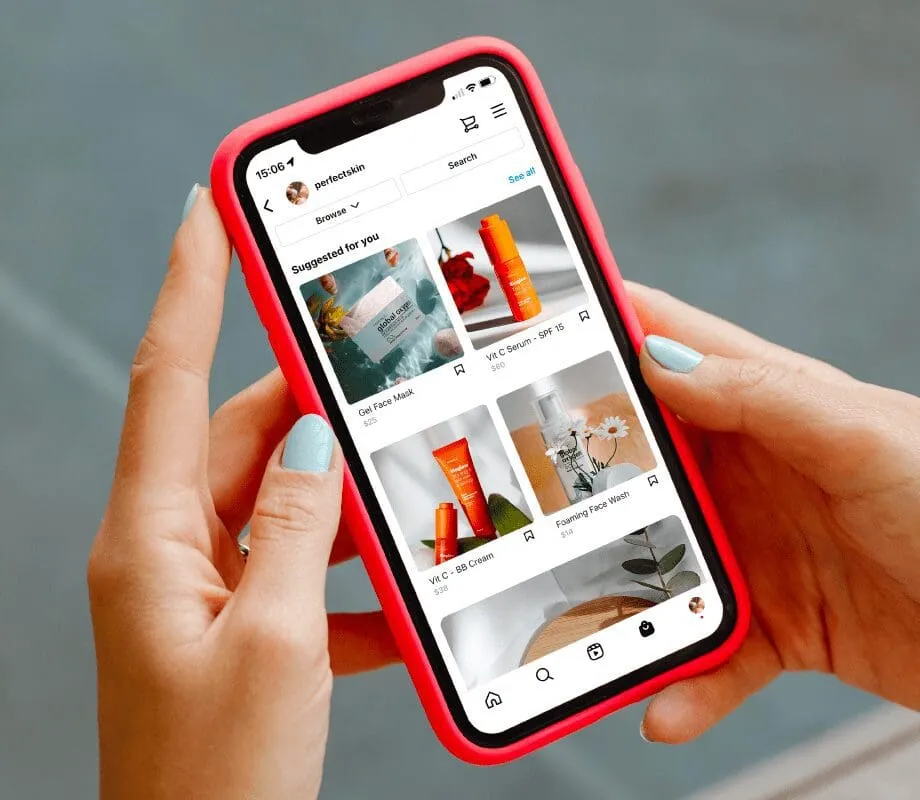
- Covet Pics – build shoppable galleries from your Instagram images, including customer uploads.
- Instagram Shopping – set up a shop in Commerce Manager so customers buy directly in-app. Free.
- Taplink – a micro landing page that turns one bio link into many, with order alerts.
 Source: Later
What are the best Instagram management tools?
Stay on top of the whole operation with these:
- Sked – scheduling plus analytics, link-in-bio, team collaboration, and post and caption ideas.
- Loomly – post ideas, a content library, optimisation tips, mockups and an approval workflow for teams.
- Sendible – plan content and strategy, work as a team and read the results back through analytics.
What are the best Instagram marketing apps?
Whether you’re a brand or a creator, these help you market on Instagram:
- Awario – track mentions, find creators and leads, and monitor competitors.
- Linktree – turn a bio into a landing page linking to platforms and promotions.
- Hoo.be – an invite-only bio tool favoured by creators for consolidating links.
How we see it: tools schedule the work, systems make it perform
A good stack saves hours. It won’t, on its own, make influence compound. Tools tell you what happened on a post; they don’t decide which creators to back, how content should ladder across a brand, or how attention turns into measurable growth over time. That’s the harder, more valuable problem, and it’s the one we solve.
Vamp is a tech-enabled influencer marketing agency. We design creator-led growth systems and build the measurement behind them, so Instagram becomes a performance channel rather than a posting schedule. If you’re a brand ready to make that shift, talk to us.
Instagram tools FAQs
Which Instagram tools are best for small businesses or creators on a limited budget?
Start with the free options. Instagram Insights covers basic analytics, Canva handles design, and Snapseed covers photo editing, all at no cost. When you outgrow them, a single multi-purpose tool like Later (scheduling, planning and analytics in one) usually delivers more value than several single-purpose subscriptions.
Are there Instagram tools designed for team or partner collaboration?
Yes. Loomly, Sked and Sendible all include approval workflows and shared content libraries. More general tools like Trello and Planoly also help teams and external partners plan, approve and schedule content together.
What’s changing in Instagram tools, especially with AI?
AI now sits inside most of the established tools. Hashtag optimisation, sentiment analysis, caption help and content recommendations are common in platforms like Iconosquare, Flick and Tailwind. The useful shift isn’t novelty; it’s automation of the repetitive work, which frees teams to spend more time on judgement and creative.