Instagram features for marketing: the ones that move the needle

The Instagram features that matter for marketing are the ones that turn attention into action: business tools for publishing and insight, messaging for two-way relationships, and Stories, Reels and shopping for distribution and sales.
Instagram has more features than any single brand will ever use. The skill isn’t knowing all of them. It’s knowing which ones do work. A pile of underused stickers and tools doesn’t build a brand; a few features, used deliberately and consistently, do.
This guide walks through the Instagram features worth your time as a brand or creator account: what each one is for, and how to use it so it earns its place in your strategy.
The short version:
- Business tools (Meta Business Suite, the professional dashboard, desktop publishing) handle the operational layer: scheduling, insights, performance.
- Messaging (DMs, group chats, automated replies) is where relationships compound; Instagram’s algorithm rewards two-way interaction.
- Stories and Reels are your distribution engine: Reels for reach, Stories for depth and community.
- Shopping (product tags, collections, checkout) shortens the path from attention to purchase.
View this post on Instagram
Instagram business features
Before the content features, the operational ones. These are what business and creator accounts use to publish efficiently and understand how their content actually performs.
Desktop publishing
You don’t have to run your Instagram from your phone. Instagram supports creating and publishing posts from a desktop browser: open Instagram, select Create, and import your photos and videos. For teams producing content at volume, planning and publishing from a desktop is faster and easier to review.
Meta Business Suite
Meta Business Suite is a free management tool for running your Instagram and Facebook accounts together. From one hub you can create and schedule posts, manage comments and messages, handle ads, and track performance across both platforms.
Professional dashboard
Available in the app, the professional dashboard is where you track performance, access creator and business tools, and keep up with platform changes. Its three core areas:
- Insights: reach, engagement and audience demographics, plus post-level performance so you can spot patterns over time.
- Tips and resources: tools, guidance and inspiration from other businesses and creators.
- Your tools: quick access to everything your account is eligible for, including branded content and ad tools.
How we see it: these tools tell you what happened. The harder, more valuable question is what to do next: which signals to act on, which content to back, how influence compounds across a brand over time. The dashboard is the input; the decision is the work.

Instagram messaging features
Messaging is where brand relationships are actually built. Two-way interaction signals genuine interest, and Instagram’s algorithm rewards it, so the DM is both a relationship tool and a performance one.
Direct messages
Private one-to-one conversations with users. The closest thing Instagram has to a direct line to a customer.
Group chats
Start a chat for two or more people, useful for small feedback pods, community groups, or close-knit customer cohorts.
Audio and video calls
Connect with followers in real time through audio or video, or send voice notes and video messages via DM.
Automatic replies
Set pre-written responses that send automatically when a DM arrives, so people get an instant first reply. Paired with tools like ManyChat, this automation can route and qualify conversations intelligently: fast response without losing the personal feel.
Reply to comments with a DM
Respond to a public comment with a private message instead of another public reply. It’s a natural way to take a conversation deeper and personalise the follow-up.
Unsend messages
Sent the wrong message? Unsend removes it from the chat for everyone, handy when you’re managing a busy inbox.
Vanish mode
Where available, vanish mode lets a message disappear after it’s been seen.
Instagram notes
Notes work like a bulletin board: pin a short message to the top of your followers’ inbox. Notes stay visible for 24 hours and are seen by mutual followers, good for lightweight, timely prompts that keep you top of mind.
Instagram Story features
Stories are where you deepen relationships and build community. They’re informal, frequent, and built for interaction, which makes them one of the best tools you have for turning followers into a community.
Story captions
Layer text and emojis over your Stories to add context and personality. Use fonts, colours and sizes to create eye-catching captions that hold attention.
Story highlights
Pin Stories to the top of your profile so followers can find key information after the 24-hour window. Group them by theme to tell a coherent brand story.
Story links
Use the Link sticker to send people anywhere with a URL: a product page, an article, a podcast, an FAQ. One of the most direct ways to turn a Story into traffic.
Interactive Story stickers
Polls, quizzes and question stickers open conversations and tell you what your audience thinks. Treat every response as a small consumer-insight feed.
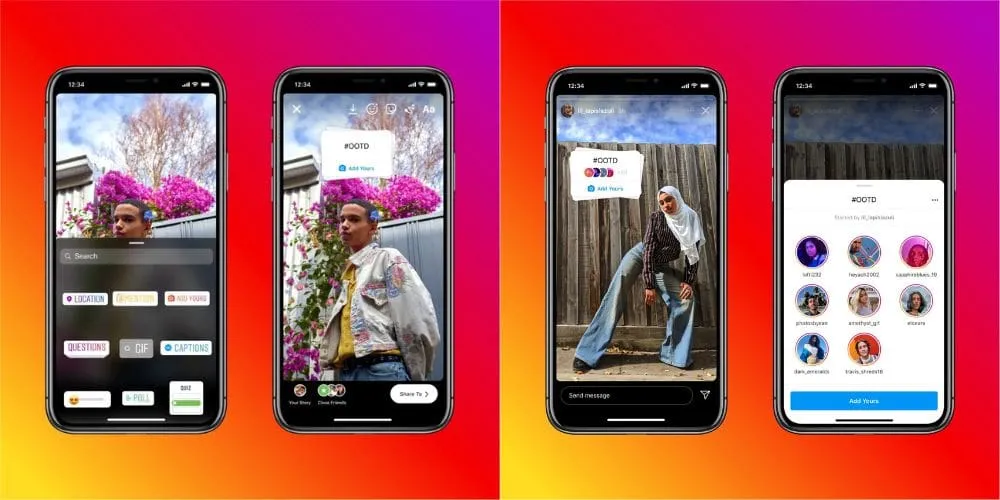
Add yours
The Add Yours sticker invites followers to join a prompt with their own photo or video, a simple, scalable way to generate user-generated content and pull your community into your brand.
Story shopping
If you run an Instagram shop, the Shopping sticker lets you tag products directly in a Story so people can buy from where they’re already paying attention.
Instagram Reels features
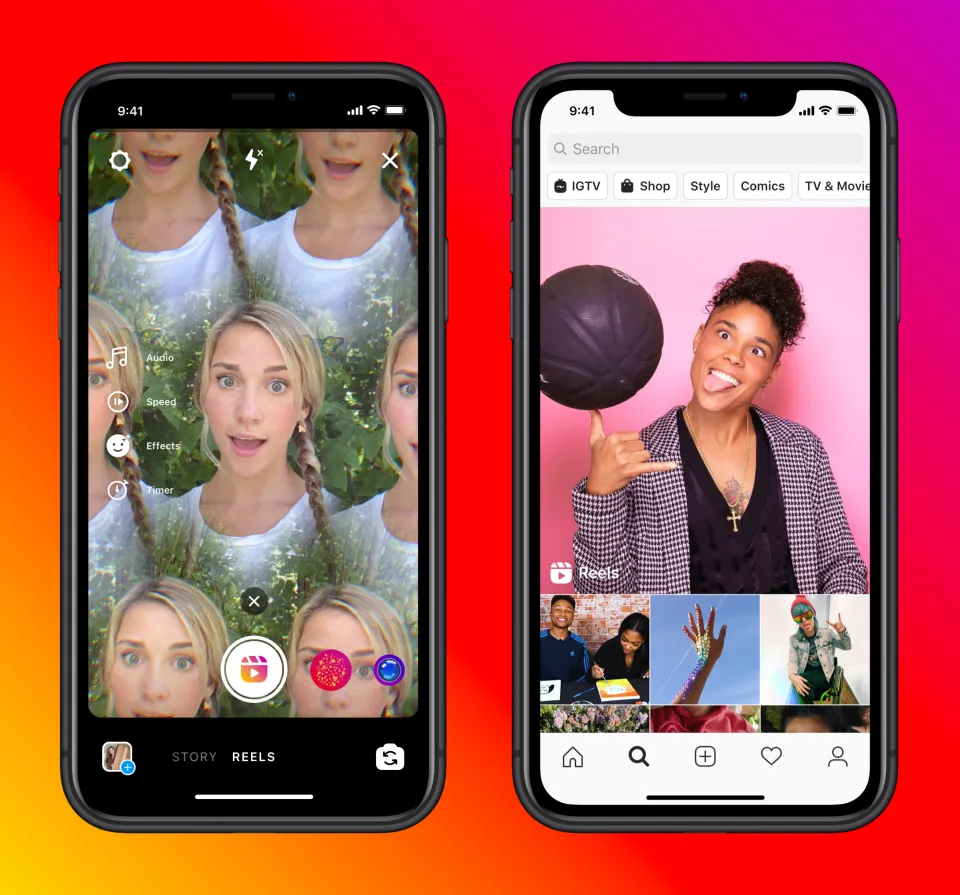
If your goal is reach, Reels is where it happens. Short-form video is Instagram’s most heavily distributed format, and these features make it easier to produce at the pace the format demands.
Editing
Instagram’s in-app editing keeps improving. Trim and cut clips, and add filters, transitions, music and overlays without leaving the app.
Remix
Remix lets you integrate clips from other Reels, reaction videos, duets, collaborative mashups, to plug into existing conversations and formats.
Templates
Pre-built templates give your Reels a ready-made structure. Pick one that fits your brand, drop in your footage, and customise with text, overlays and music. A fast way to keep a consistent output without starting from a blank canvas.
Captions
Auto-generated captions transcribe your audio so people can watch with the sound off, which most of them do. They also widen accessibility and tend to lift watch time.
Instagram shopping features
Shopping features let people buy your products without leaving the app, collapsing the distance between attention and purchase. The key ones:
Collections
Group products into categories for a cleaner, more navigable shopping experience.
Product detail pages
Pull information from your catalogue: pricing, descriptions, imagery. When you tag a product in a post, this is the page that information feeds.
Checkout on Instagram
Checkout lets people complete a purchase directly in the app, removing the extra step of bouncing out to your site.
Other Instagram features worth knowing
A few more that earn their place in a brand’s toolkit:
- Archived Stories: repurpose past content or revisit quiz and poll results.
- Instagram Live: real-time engagement that builds authenticity and showcases products.
- Instagram Guides: curate content around themes like product launches or brand storytelling.
- Pinned comments: control the first comment your audience sees by pinning it below your caption.
- Instagram collabs: two accounts share one post across both feeds, ideal for creator partnerships and joint launches.
Which Instagram features should I prioritise?
Don’t try to use everything. Start from the job you need done:
- Reach a new audience → Reels (editing, templates, remix).
- Build loyalty and community → Stories (interactive stickers, Add Yours) and messaging.
- Drive sales → shopping features and Story links.
- Understand performance → the professional dashboard and Meta Business Suite.
Pick the two or three that map to your current priority, use them consistently, and judge them on outcomes, not on how many features you’ve ticked off.
FAQs
What are the most important Instagram features for brands?
The ones tied to a clear goal: Reels for reach, Stories and messaging for community, shopping for conversion, and the professional dashboard for measurement. A few used well beat many used occasionally.
Are Instagram business features free?
The core tools, Meta Business Suite, the professional dashboard, insights, scheduling, are free with a business or creator account. Some shopping and ad capabilities depend on eligibility and your wider commerce setup.
How do Instagram features affect reach?
Instagram’s algorithm rewards formats and behaviours that keep people on the platform and interacting, particularly Reels and two-way messaging. Using those features well sends positive signals; ignoring them leaves distribution on the table.
Features are the toolkit. A system is what makes them perform.
Knowing every Instagram feature is table stakes. The harder, more valuable problem is turning them into sustained relevance: choosing the right creators, the right formats and the right cadence, and connecting it all so attention becomes measurable growth instead of scattered activity.
That’s the work we do. Vamp is a tech-enabled influencer marketing agency: we design creator-led growth systems and build the distribution and measurement behind them, so Instagram becomes a performance channel, not a posting schedule. Talk to us.