How to use songs and sounds and join challenges on TikTok

To use songs and sounds and join challenges on TikTok, open TikTok's sound library, add a trending track to your video, and pair it with the challenge's hashtag in your caption.
Do those two things together, the right audio plus the right hashtag, and your video gets indexed on both the sound’s feed and the hashtag’s feed, putting it in front of people who don’t follow you yet. On TikTok, sound is not decoration. It is distribution.
That’s the whole mechanic. Below is how to find trending audio, save the sounds you like, and join a challenge so your content has the best chance of travelling.
Key takeaways:
- TikTok’s sound library is where trends and challenges start. Trending audio is a discovery channel, not a soundtrack.
- To join a challenge properly, use the correct trending sound and the relevant hashtag, both, every time.
- Saving sounds to your Favourites lets you move fast when a trend is still climbing. Timing beats polish.
- Original audio can start its own trend; if it catches, your video stays pinned to the top of that sound’s feed.
What is TikTok’s sound library and why does it matter?
The sound library is TikTok’s bank of music and audio clips, and it’s where most challenges and trends originate. It’s full of tracks creators can add to a video at any time. You can also post with your own original sound, which other people can then reuse when they film their own version.
This matters because sound is one of TikTok’s strongest discovery signals. Every track has its own feed of videos that have used it. Tap a sound, and you can scroll every clip built on it. The more a sound is used and engaged with, the more the videos using it surface on other people’s For You pages. Pick audio that’s already climbing, and you borrow that momentum.
How do I join a TikTok challenge?
When you join a challenge, do two things, and do both:
#1 Use the correct trending audio in your video.
#2 Use the relevant hashtag in your caption.
A clear example is the #ImJustAKidChallenge. Creators use Simple Plan’s “I’m Just A Kid” clip and recreate an old childhood photo, showing the original image to make the comparison, with #ImJustAKidChallenge in the caption.
If your content carries both the hashtag and the sound, your video shows up on the sounds feed and the hashtags feed, two discovery surfaces instead of one. The more traction it earns there, the better its odds of reaching the For You page.
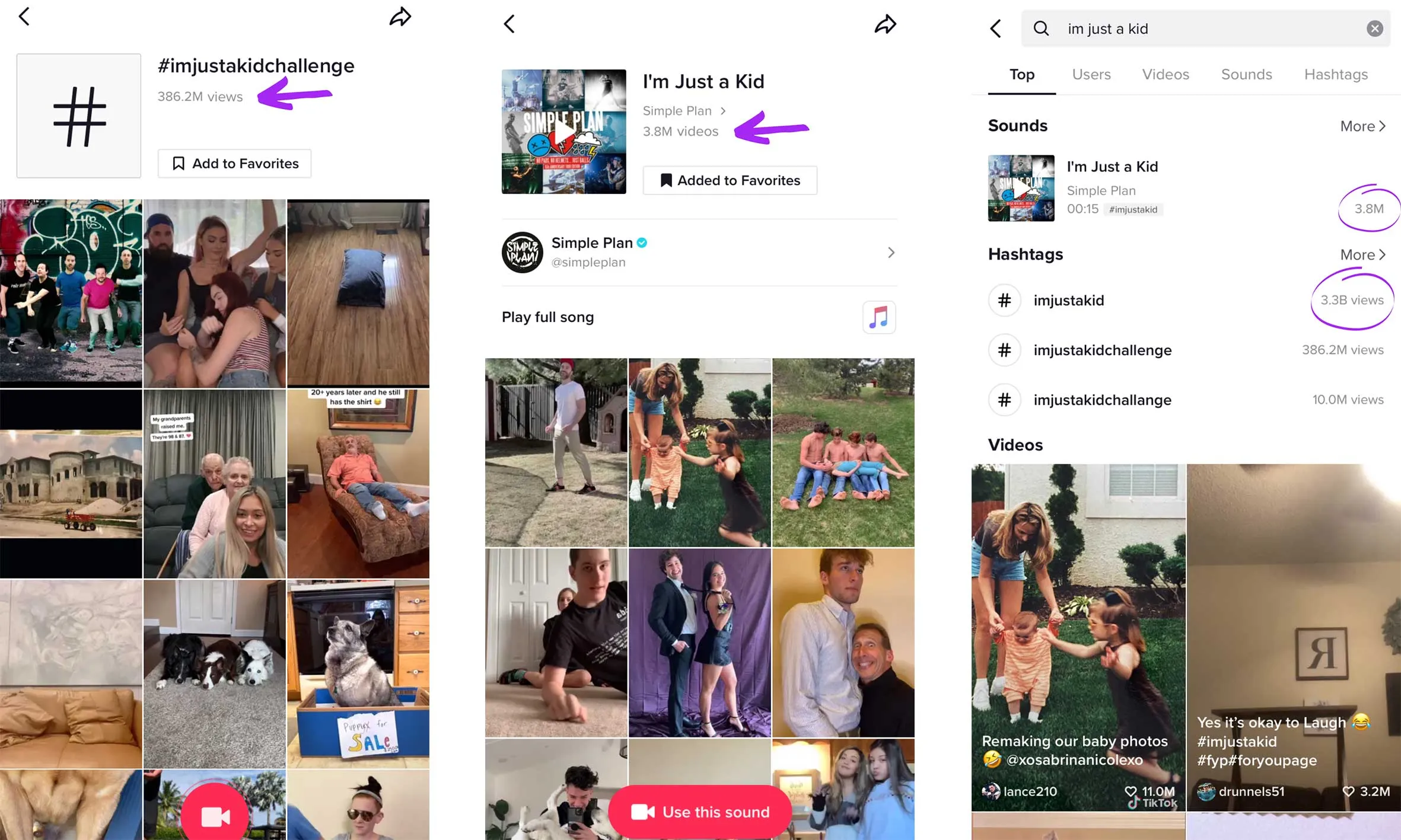
Sometimes a creator posts with their own audio and accidentally starts something. Others adopt that sound to make their own version. One original audio, for instance, kicked off a trend of people using it to show off a cute puppy. The sound has been used for hundreds of thousands of videos, and because it’s the source, the original clip sits at the top of that sound’s feed. Worth remembering if you want your own audio to travel: be first, and the format works for you.
Not every track belongs to a single trend. One popular song has been used well over a million times across all kinds of videos. Versatile audio gives you more ways in.
How do I find trending songs and sounds on TikTok?
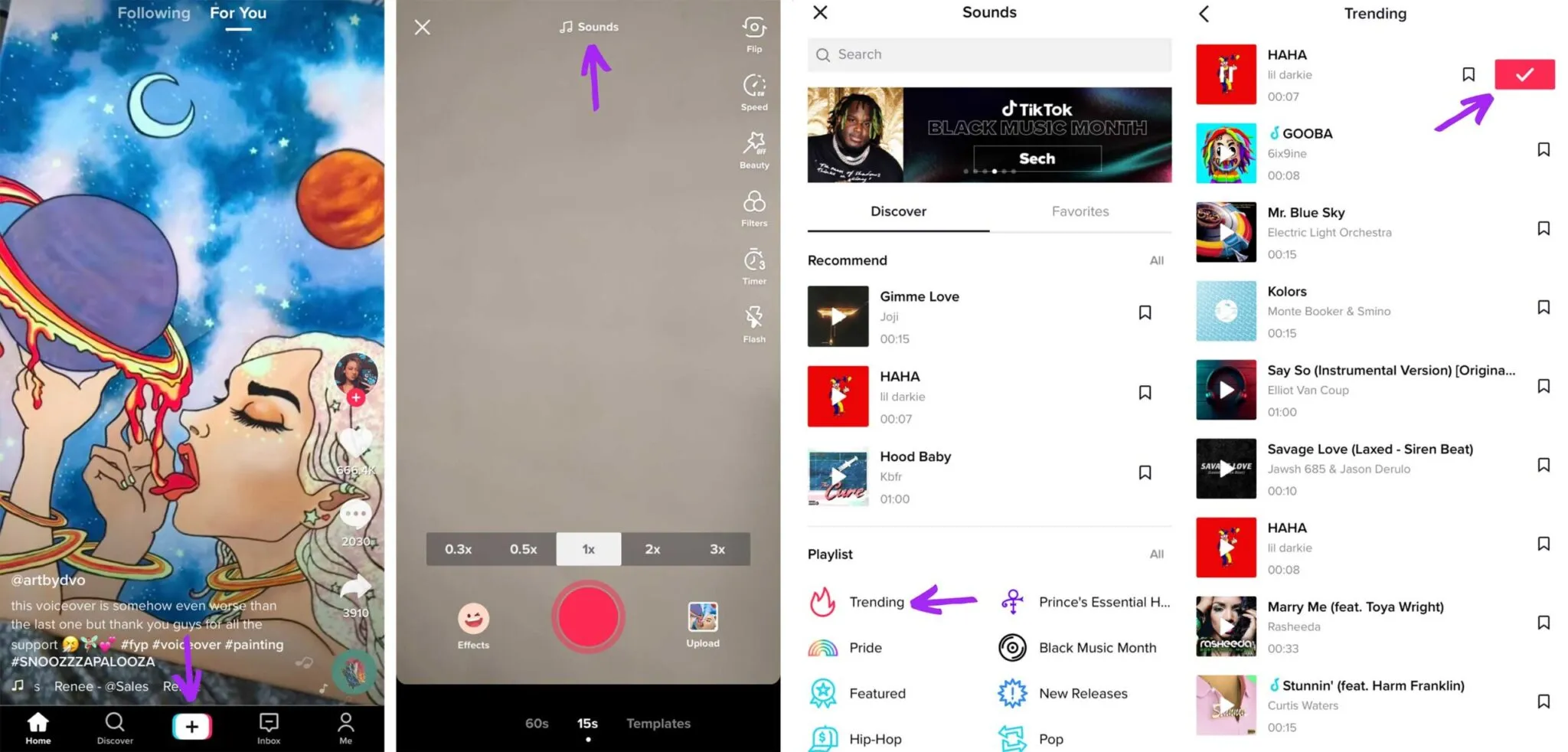
Here’s how to find the most popular songs and sounds for your next video:
#1 Tap the white plus button at the bottom of your screen.
#2 Tap ‘Add sound’ at the top of your screen.
#3 Scroll through the playlists, such as ‘Trending’ or ‘Featured’.
#4 Tap a sound to preview it. Tap the red tick and you’ll go to the editing page, ready to film with that sound.
How do I save a sound on TikTok to use later?
If a sound catches your eye while you’re on your For You page, save it to your Favourites and come back when you’re ready to film. Here’s how:
#1 Tap the name of the sound (it sits under the video’s caption).
#2 You’ll land on a screen showing the track name, a preview option and the ‘Add to Favourites’ button.
#3 Tap ‘Add to Favourites’.
#4 Go to your profile and tap the bookmark icon next to ‘Edit profile’.
#5 That’s where your favourited videos, hashtags, sounds and effects live.
When someone taps a sound from a video on their For You page, every TikTok that has ever used it is organised into one feed, which is exactly why sound drives discovery. The more a person interacts with a popular sound, the more likely videos using it land on their For You page. Use trending sounds well, and your content can reach far beyond your following.
How we see it
The creators who grow consistently on TikTok don’t treat sound as background. They treat it as a distribution decision: which audio is climbing, when to jump on it, and how to pair it with the right hashtag so the platform does the spreading for them. A trend has a window, and speed inside that window matters more than production value.
That’s also how the brands worth working with think. At Vamp, we build creator-led growth systems, and getting sound, timing and format right is part of the infrastructure that turns one good video into compounding reach. The mechanic is simple. Using it with intent is the skill.
FAQs
Do I need to use trending audio to join a challenge?
Yes. A challenge is defined by its sound and its hashtag. Use the exact trending audio and the matching hashtag so your video is indexed on both feeds and surfaces to people searching or scrolling that trend.
Why should I save sounds to my Favourites?
Because trends move fast. Saving a climbing sound the moment you spot it means you can film and post while the trend is still on the way up, rather than after it has peaked.
Can my own original sound start a trend?
It can. If you post with original audio and it catches on, other creators will reuse it, and because you posted it first, your video stays at the top of that sound’s feed for everyone who taps it.
Does using a popular sound guarantee my video reaches the For You page?
No. Trending audio improves your odds by adding a discovery surface, but reach still depends on how people respond to the video itself. Strong audio plus the right hashtag plus content people watch through is the combination that travels.